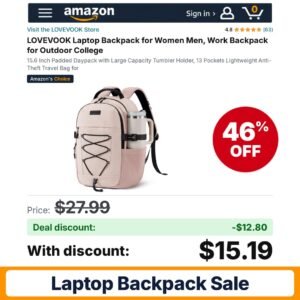
 LOVEVOOK Laptop Backpack Pink
Deal
Check price on Amazon 
Updated Tuesday, October 27, 2026 · 31 deals · newest first. Tap a code to copy it, then open the deal for how to apply it.
A good bag has to carry a computer, a charger, a water bottle and the rest of the day without wearing out your shoulders, and this page tracks current laptop backpack deals from Amazon sellers. The range covers slim work packs, college bags with a giant tumbler holder, heavy duty travel packs sized for 17 inch machines, anti-theft designs with a USB charging port and vintage canvas styles.
Start with your laptop's screen size and the sleeve dimensions listed for each bag, then compare compartments, straps and carry-on details. A few listings carry a seller promo code and others offer a clip coupon, so check the product page for both and confirm the total at checkout.
LOVEVOOK Laptop Backpack Pink
 MATEIN HER 2 in 1 Womens Laptop
 The North Face Women’s Vault Everyday Laptop Backpack
 MATEIN Laptop Backpack
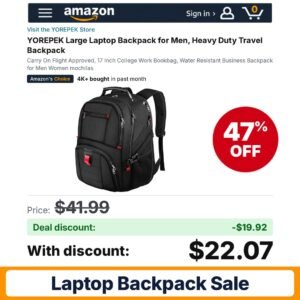 YOREPEK Large Laptop Backpack
 Lrenagao Laptop Backpacks
 Lrenagao Laptop Backpacks
 Solo New York Laptop Backpack
 Baggallini Everyday Laptop Backpack
 CROSSGEAR Travel Backpack 40L Expandable Large Ergonomic
 Amovee Tavel Laptop Backpack
 LOVEVOOK Laptop Backpack Light Purple
 LOVEVOOK 24L Laptop Backpack
 CAFELE 17.3 Inch Laptop Backpack
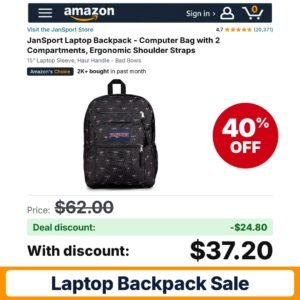 JanSport Laptop Backpack
 YALUNDISI Vintage Backpack Travel Laptop Backpack
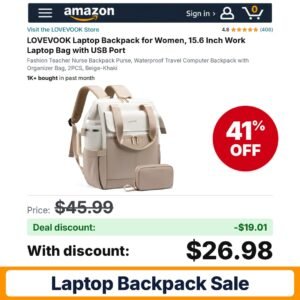 LOVEVOOK Laptop Backpack Beige – Khaki
 SwissGear 8117 Laptop Backpack
 Kipling Women’s Seoul Bts 15″ Laptop Backpack
 fufazfo Corduroy Laptop Backpack
 SwissGear 8118 Laptop Backpack
 Baggallini Essential Laptop Backpack
 WENIG Anti-Theft Travel Laptop Backpack
 KOPHLY Laptop Backpack
 RealCool 15.6-17.3″ Laptop Backpack
 LOVEVOOK Laptop Backpack
 LOVEVOOK Laptop Backpack Women
 MGB Laptop Backpack
 LOVEVOOK Laptop Backpack 22L/27L
 LOVEVOOK Laptop Backpack Light Pink-beige-brown
 Solo New York Laptop Backpack Blue
The best laptop backpack is the one that fits your computer properly, holds everything else you carry and stays comfortable for the length of your commute or trip. Before comparing colors and logos, list what goes in the bag on a normal day. A student might need room for textbooks and a large drink cup. A commuter may only carry a laptop, a charger and lunch. A frequent flyer needs a bag that slides under the seat and opens easily at security.
From there, focus on three areas: the laptop sleeve, the overall capacity and layout, and the carry system. Getting these right matters far more than extra pockets you will never use.
The deals on this hub span several distinct styles. Lightweight everyday packs, such as the MGB backpack, keep things simple. Women's work and college packs, such as several LOVEVOOK designs, add a dedicated holder for a large tumbler and a more polished look. Classic school packs, such as the JanSport two-compartment model, focus on durability and straightforward layout. Large travel packs, such as the YOREPEK bag, offer space for bigger laptops and multi-day trips. Anti-theft and USB port designs, such as the WENIG pack, and vintage-style bags, such as the YALUNDISI backpack, round out the mix.
| Type | Best for | What to check |
|---|---|---|
| Lightweight everyday pack | Short commutes and light loads | Sleeve size, padding, water resistance wording |
| Work or college pack with tumbler holder | Long days on campus or at the office | Cup holder size, laptop sleeve fit, compartments |
| Classic two-compartment school pack | Books plus a laptop | Sleeve dimensions, strap design, haul handle |
| Large travel pack | Flights and weekend trips | Personal item or carry-on size, 17 inch fit, luggage strap |
| Anti-theft pack with USB port | City commuting and travel | Hidden zippers, lock point, whether a power bank is included |
| Vintage canvas pack | Casual style with everyday utility | Material, sleeve padding, actual capacity |
Laptop backpacks are commonly made from polyester or nylon, with some vintage styles using canvas and faux leather trim. Read the material line on each listing instead of judging from photos. Most bags are cleaned by spot washing with mild soap and air drying, and machine washing can damage padding or coatings, so check the care guidance first.
When a new bag arrives, adjust the shoulder straps so the bag sits high on your back rather than sagging toward your hips. Put the heaviest items, like the laptop, closest to your back. If the bag has a USB port, route the internal cable to your power bank pocket before loading everything else.
A big bag invites overpacking. If you carry a heavy laptop every day, a mid-size pack with good organization often feels better than a cavernous travel bag, because the load stays close to your back. Listings rarely state the empty weight clearly, so compare materials and frame details when two bags look similar.
Back-to-school season from late July through August is the classic time for backpack sales, and Prime Day in July often overlaps with it. Prime Big Deal Days in October and Black Friday through Cyber Monday bring another round of travel and work bag discounts. Post-holiday clearance in January can be a good time to find older colors marked down.
A seller promo code is entered in the promo field during checkout, while a clip coupon is a checkbox on the product page you activate before adding the item to your cart. On many listings both can apply, though some codes are tied to certain colors or quantities. Subscribe and Save does not apply to backpacks, so it will not factor in here.
Before placing the order, check the order summary on the final checkout page. Each discount should show on its own line. If a code is missing, read the promotion terms for eligible variants or dates.
Usually, but not always. Screen size describes the display, not the body, and some laptops are wider or thicker than average. Compare your laptop's real measurements with the sleeve dimensions on the listing, and look at photos showing a laptop in the sleeve when available.
In most cases the port is a pass-through that connects to a power bank you put inside the bag. Check the listing to see whether a power bank is included. Many do not include one, so plan to use a battery you already own.
Not necessarily. Airlines set their own personal item and carry-on limits. Compare the bag's listed dimensions with your airline's current rules, and remember that an overstuffed bag can measure larger than its listed size.
Often you can. Clip the coupon on the product page, add the bag to your cart and enter the seller code at checkout. The order summary will list each discount when both apply. If one is missing, check whether it covers only certain colors or sizes.
Back-to-school season in late July and August is a strong period, often overlapping with Prime Day. Prime Big Deal Days in October and Black Friday through Cyber Monday bring more discounts, and January clearance can help with older colors. Sellers also add codes throughout the year.
As an Amazon Associate, FindsCheaper earns from qualifying purchases. Promo codes and coupons are set by sellers, can sell out or end early, and the final price is always the one shown in your Amazon cart.