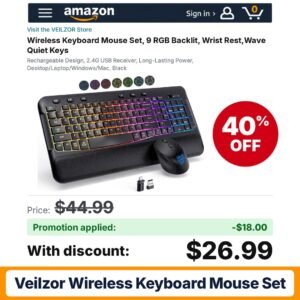
 VEILZOR Wireless Keyboard Mouse Set
Code
Check price on Amazon 
Every electronics deal and promo code we have posted, newest first. Updated October 26, 2026.
Electronics on Amazon is a mix of quick add-ons and considered purchases. On one end sit cables, adapters, cases, filters and laptop backpacks that sellers discount constantly. On the other are smart watches, wireless earbuds, over-ear headphones, Bluetooth speakers, security cameras, dash cams, binoculars, projectors and digital picture frames, where a strong promo code can make a real difference to what you spend.
Electronics listings are dense with spec claims, so the trick is to compare the details that matter for how you will use the device, check compatibility, then look at the savings. This page rounds up current electronics offers and explains how to read a tech listing, when the big sale windows usually arrive, and how codes and clip coupons combine so you can confirm the final total in your cart.
VEILZOR Wireless Keyboard Mouse Set
 Belkin Mini DisplayPort to HDMI Adapter
 Monoprice 4K High Speed HDMI Cable 28AWG
 OYIB Bluetooth Shower Speaker IPX7
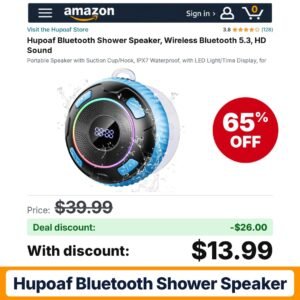 Hupoaf Bluetooth Shower Speaker
 CHENRUIDA Everyday Lightweight Clip On Earbuds-Open Ear
 Pemoon Smart 4K Projector
 JCJ Arch Backdrop Cover 7.2FT 6.6FT Black
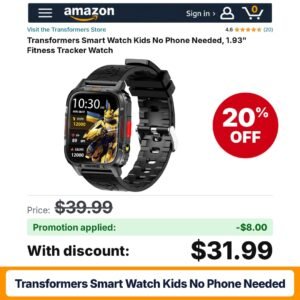 Transformers Smart Watch Kids No Phone Needed Black
 UQO Wallet Tracker Card
 SCOKC 10×32 Monocular Telescope
 HXMJ-Full Size Wireless Large Print Keyboard
 HLWQ USB-C to USB-C Cable 2Pack 5ft
 MYATOTO Magic AI Box
 URIIU 2025 Antenna
 NEEWER Replacement Battery and Charger Set
 Addtam Power Strip Surge Protector
 Glooglitter 2 Pcs USB Car Fan
 Vulendu Wireless CarPlay Adapter
 adidas Classic 3-Stripe School Backpack 27L 16-In One Size
 StarTech Cat6 RJ45 Modular Plugs
 sotfkd 2 Pack GPS Tracker
 sweguard USB-C to HDMI Cable 1.5ft 4K
 VOPLLS Smart Mini Projector 4k
 ZXQZYM 15 Pack Bulk Headphones
 adidas Prime School Backpack 37L 17-In
 Metra 40-NI10 Nissan Antenna Adapter
 Mingtawn Military Smart Watches
![SANSUN [ETL Listed] 12V Power Supply 3A – 50% off](https://findscheaper.com/wp-content/uploads/2026/10/sansun-etl-listed-12v-power-supply-3a-amazon-promo-code-300x300.jpg) SANSUN [ETL Listed] 12V Power Supply 3A
SANSUN [ETL Listed] 12V Power Supply 3A
 DKVULT Backpack
 CELTICBIRD Binocular Harness Chest Pack
 TiMOVO Case for Samsung Galaxy Tab A11+/A11
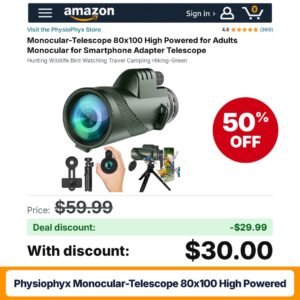 PhysioPhyx Monocular-Telescope 80×100 High Powered
 LandAirSea 54 GPS Tracker
 Amazon Echo Spot
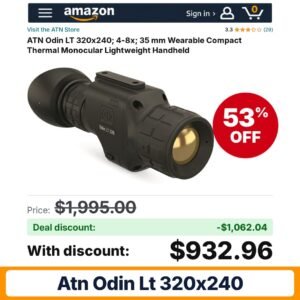 ATN Odin LT 320×240
 Lenovo USB-C 65W AC Adapter
 Tiffen 52mm Black Pro-Mist 1 Cinematic Diffusion
 occiam Active Noise Cancelling Earbuds Wireless Bluetooth IPX7
 Soke for New iPad Air 13 Inch
 Belkin Lightning Wired Keyboard Plug & Play
 MALLRACE 18.5 Inch Gaming Laptop
 BREVITE The Backpack- Casual daypack backpacks
 Monoprice 100649 12′ 3.5mm Stereo Plug/Jack M/F
 Leviton Telephone Patching Expansion Board
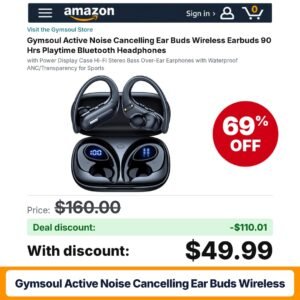 Gymsoul Active Noise Cancelling Ear Buds Wireless Black
 Blrakx New Waterproof Open-Ear Bone Conduction Headphones Black-Grey
 Dbasne Bluetooth Shower Speaker IP7 Waterproof Portable
Gadget listings are written to impress. Resolution numbers, channel counts and long feature lists can make two very different products look alike. The way to cut through it is to start with the job you need done, decide which two or three specs actually affect that job, and then compare only listings that meet them. Once you have a short list, look at which ones carry a seller promo code or a clip coupon. A modest discount on the right device beats a big one on a gadget that does not fit your setup.
Smart watches, wireless earbuds, over-ear headphones and Bluetooth speakers are among the most heavily promoted items in this department. Check which phone platforms the device supports, whether its app is required for key features, the stated battery life, and whether noise cancelling is active or simply passive isolation from the ear cups.
Indoor cameras, such as Gianteye two-packs that double as pet monitors, window-mounted cameras with a built-in screen, PTZ outdoor systems and multi-channel dash cams such as GEMEK models all compete for attention. Compare resolution, Wi-Fi band support, where footage is stored (memory card, local hub or cloud), and whether advanced detection features require a subscription.
Outdoor projectors with built-in apps and Wi-Fi digital picture frames, such as Frameo models, are popular gifts. For projectors, check native resolution versus supported input, brightness claims and which streaming apps are officially included. For frames, look at screen size and how photos are sent to the device.
These are the everyday buys that make up much of the deal volume. They are cheap enough that people skip the details, which is exactly when compatibility mistakes happen. Confirm connector types, wattage support, device model for cases, and thread size for lens filters.
Binoculars list magnification and objective lens size. Higher magnification is not always better, as it can make the image harder to hold steady. Look at weight and whether a tripod adapter is mentioned.
| Type | Best for | What to check |
|---|---|---|
| Smart watches | Notifications and activity tracking | Phone compatibility, battery life, band size |
| Earbuds and headphones | Commuting, calls, travel | Noise cancelling type, codec support, fit options |
| Bluetooth speakers | Outdoor and room audio | Water resistance rating, pairing features, battery |
| Security cameras | Watching a home, pet or entrance | Wi-Fi band, storage method, subscription needs |
| Dash cams | Recording drives | Channel count, card size support, mounting |
| Cables and adapters | Charging and connecting devices | Connector type, wattage, cable length |
Electronics tend to see their sharpest promotions around the big shopping events. Prime Day in July is a major window for headphones, earbuds, smart watches and cameras. Back-to-school brings deals on laptop backpacks, cables, adapters and audio gear. Prime Big Deal Days in October and the Black Friday and Cyber Monday stretch usually bring the deepest cuts on gift-friendly items such as picture frames, projectors and speakers. After the holidays, post-holiday clearance is a good time for accessories and last year's models as sellers make room for new releases.
Most electronics savings come in two forms. A seller promo code is entered at checkout in the promotional code field and takes a percentage off the listing. A clip coupon appears as a checkbox beneath the price and applies in the cart once clipped. Whether they combine is set by the seller, so you will sometimes see both apply and sometimes only one.
Subscribe and Save is uncommon in electronics, though it can appear on consumables like batteries or cleaning supplies for screens and lenses. Do not expect it on devices.
To confirm the final total, clip any coupon, add the item to your cart, enter the code, and read the order summary. Each discount should appear as its own line. If a code fails, look at its terms for the eligible variant, required quantity and expiry date.
Electronics reward a careful shopper. Match the specs to the job, check what else you might need to buy, and let the codes and coupons do the rest.
Some do and some do not. Many cameras record to a memory card or local hub, while advanced detection or cloud history may need a paid plan. Read the bullets and the Q&A section to see which features work without a subscription.
Audio gear usually sees strong promotions during Prime Day in July, Prime Big Deal Days in October, and the Black Friday and Cyber Monday period. Watch for clip coupons under the price as well as seller codes during those windows.
It depends on the seller. Clip the coupon, add the item to your cart, then enter the code at checkout. If both discounts show as separate lines in the order summary, they stacked. If one disappears, the seller does not allow combining.
Look at how many channels it records, which memory card sizes it supports, whether a card is included, and how it is powered and mounted. Multi-channel models cover more angles but need more cable routing inside the car.
Seller codes often cover specific variants. A code might work on a single camera but not a two-pack, or on one color only. Switch the variant, reread the promotion terms, and check for minimum quantity requirements.
As an Amazon Associate, FindsCheaper earns from qualifying purchases. Promo codes and coupons are set by sellers, can sell out or end early, and the final price is always the one shown in your Amazon cart.