 AKINGUAR 2K 3MP Window Security Camera
Deal
Check price on Amazon 
Updated Monday, October 26, 2026 · 35 deals · newest first. Tap a code to copy it, then open the deal for how to apply it.
Our security camera deals cover nearly every way to watch a home: solar-powered outdoor units, stick-on window cameras that face out through the glass, compact indoor cameras that double as pet monitors, and cellular models that work where there is no WiFi. Many of the listings come from smaller brands that run frequent promotions.
A good share of these deals carry seller promo codes, and clip coupons show up often too, which makes this one of the better categories for stacking savings. Scroll past the listings for a guide on picking the right camera type, the specs worth checking, setup tips and how to confirm your final checkout total.
AKINGUAR 2K 3MP Window Security Camera
 VOSKER VKX 4G LTE Solar Cellular Security
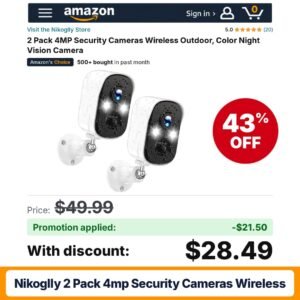 Nikoglly 2 Pack 4MP Security Cameras Wireless
 HOSAFE.COM 4G Cellular Security Camera Wireless Outdoor
 ANNKE 3K Wireless Security Camera Outdoor
 youkey 2.5K Indoor Pet Security Camera
 Chpuss Solar Security Camera Wireless Outdoor 2-Way
 Chpuss Solar Security Camera Wireless Outdoor 2-Way
 firstrend 2K QHD Solar Security Cameras Wireless
 CAMSTRO 4G LTE Cellular Solar Security Camera
 PBSEV Security Camera Indoor 1080P Wired
 SEHMUA Solar Security Cameras Wireless Outdoor
 ARCCTV 4K Solar Security Cameras Wireless Outdoor
 Noahlink 2K Security Cameras Wireless Outdoor
 AlkiVision Solar Security Cameras Wireless Outdoor
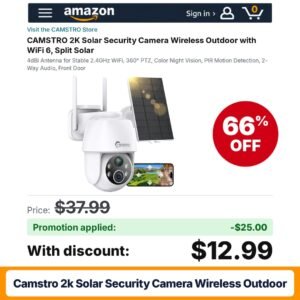 CAMSTRO 2K Solar Security Camera Wireless Outdoor
 DEKCO Wired 2K Security Camera Outdoor
 Zmodo 4MP Smart Window Security Camera
 Fehuatenda 1 Pack – Solar Panel
 CASACOP Smart Security Camera
 Poleeye Light Bulb Security Camera Outdoor
 GNCC 2K Indoor Security Camera
 owltron Indoor Security Camera
 HOSAFE.COM 4G LTE Cellular Security Camera No
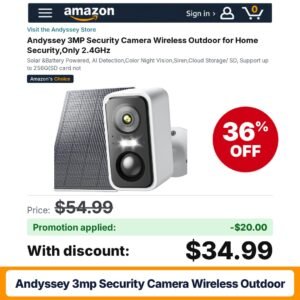 Andyssey 3MP Security Camera Wireless Outdoor
 ANRAN 4G LTE Cellular Solar Security Camera
 Tical Solar Security Cameras Wireless Outdoor 1
 FONDAIL Solar Security Cameras Wireless Outdoor
 blurams 4K Ultra Security Cameras Wireless Outdoor
 Zoall 3MP 2K Magnetic Window Camera WiFi
 DYPCO 2 Pack Window Security Camera
 Gianteye 2K Indoor Security Camera
 YOYIRYB HOME 5MP Window Security Camera
 Socheerfull 4G LTE Cellular Solar Security Camera
 SEHMUA Home Security Cameras Wireless Outdoor
Before comparing deals, decide what you actually need to see. A camera watching the front porch has very different requirements from one keeping an eye on a sleeping toddler or a dog home alone. Write down each location, whether it is indoors or outdoors, whether there is a power outlet nearby and how strong your WiFi signal is at that spot. Those four answers will rule out most of the listings on this page and make the rest much easier to compare.
Next, think about how you want to review footage. Some cameras save clips to a local memory card or a base station, while others lean on a cloud plan. Listings such as the SEHMUA two-camera system advertise that no subscription is required, which appeals to shoppers who want to avoid monthly fees. Read the description carefully to understand which features work without a plan.
These are the most common deals here, from brands such as CAMSTRO and Fondail. A small solar panel tops up the battery so you are not climbing a ladder to recharge. Many offer pan and tilt for a wide view. Check whether the panel is attached or split, since a separate panel can be placed in the sun while the camera sits in shade.
Stick-on window cameras mount on the inside of the glass and look outward, which is handy for renters or apartments where drilling is not allowed. Some include a small built-in screen, and several mention anti-glare designs to deal with reflections at night.
Plug-in indoor cameras, such as the Gianteye two-pack, are often marketed for watching pets and children. Look for dual-band WiFi support, two-way audio and event detection settings. Magnetic mounts, like those on some Zoall models, make repositioning easy.
4G LTE cameras use a mobile data connection instead of WiFi. They suit cabins, farm buildings, construction sites and driveways far from the router, but they need a compatible data plan, so factor that into the true cost.
| Type | Best for | What to check |
|---|---|---|
| Solar outdoor | Yards, driveways, sheds | Panel placement, WiFi band, storage options |
| Window camera | Renters, apartments, no-drill setups | Glare handling, mounting method, night view |
| Indoor plug-in | Pets, nurseries, entryways | Two-way audio, privacy settings, pack count |
| Cellular 4G LTE | Remote spots without WiFi | Carrier compatibility, data plan, solar support |
Install the app and connect each camera near your router first, then move it to its final spot and check the signal strength before mounting. For solar models, aim the panel toward the sunniest part of the sky and keep it clear of overhanging leaves. Wipe the lens and the panel every few months, especially after pollen season or a dusty summer. For window cameras, clean the glass on both sides and turn off nearby indoor lights at night to cut reflections. Update the firmware when the app prompts you, and set a strong, unique password on the account.
Home security gear gets heavy promotion during Prime Day in July and Prime Big Deal Days in October. Black Friday and Cyber Monday bring some of the deepest multi-pack discounts of the year. Because so many camera brands rely on seller promo codes, deals also pop up between big events, so checking back regularly can pay off.
Camera listings frequently show a clip coupon box on the product page and a separate seller promo code. Clip the coupon first, add the camera to your cart and enter the code at checkout, or use the apply link on the listing if one is offered. Subscribe and Save does not normally apply to cameras, though it may appear on accessories like memory cards. Before you place the order, look at the order summary: you should see each discount listed as its own line. If one is missing, the seller may not allow stacking or the code may have hit its limit.
The right camera is the one that matches your space, your network and the way you like to check footage. Settle those details first, and the discount becomes a bonus on top of a smart choice rather than the only reason to buy.
Not always. Several listings, such as some solar two-camera systems, advertise local storage with no subscription required. Others unlock extra features like longer cloud history through a paid plan. Read the description to see what works free and what needs a plan.
On many camera listings it does, but the seller sets the rules. Clip the coupon on the product page, then enter the code at checkout. Your order summary should show two separate discount lines. If only one appears, stacking is not allowed for that offer.
A solar camera uses a panel to charge its battery but usually still needs WiFi. A cellular camera connects over a 4G LTE network instead of WiFi, which helps in remote spots, but it needs a compatible data plan. Some cellular models also include solar charging.
Window cameras are designed to look through glass, and some mention anti-glare features to reduce reflections. Results still depend on indoor lighting and how clean the glass is. Turning off nearby lights and mounting the camera flush against the window usually helps.
Many budget cameras only work on a 2.4GHz network. If your router combines bands under one name, the camera may struggle to join. Check the listing for supported bands, move closer to the router during setup and confirm the password is entered correctly.
As an Amazon Associate, FindsCheaper earns from qualifying purchases. Promo codes and coupons are set by sellers, can sell out or end early, and the final price is always the one shown in your Amazon cart.