
Are Biometric Gun Safes Reliable? Problems, Fixes and Smart Backups

Are biometric gun safes reliable? A well-built biometric safe from an established brand is reliable enough for quick-access handgun storage, provided you treat the fingerprint reader as a convenience rather than the only way in. Most failures owners describe come from three places: fingerprints that were enrolled poorly, batteries that ran low without anyone noticing, and cheap readers that either reject the right finger or, in the worst cases, accept the wrong one. A safe with a keypad and a physical key as backups, plus a habit of changing batteries on a schedule, removes most of the risk.
This guide explains how fingerprint readers actually fail, what the recalls taught buyers, how to troubleshoot the most common “fingerprint not working” and “keypad not working” complaints, and which listing details separate a dependable biometric safe from a gamble. It is based on product listings, manuals and well-known safe-storage practice, not on marketing claims alone, and it names a few current models only where they illustrate a point.
Do biometric safes work? The short version
Yes, when the hardware and the setup are both decent. A fingerprint reader compares a scan of your finger to templates stored during enrollment. If the scan is clean and the templates are good, the match takes about a second. If your finger is wet, cold, cut, dusty or pressed at an odd angle, the reader may not find enough matching detail and will refuse. That is a false rejection, and it is by far the most common complaint behind searches like “vaultek fingerprint not working.”
The opposite failure, a false acceptance, is rarer and far more serious: the reader opens for a finger that was never enrolled. That is exactly the defect behind the biometric gun safe recalls covered below. A reliable safe keeps false rejections low and false acceptances near zero, and the second matters more than the first because a safe that opens for a child has failed at its only real job.
Biometric gun safe reliability in one table
| Access method | Typical speed | Common failure | What reduces it | Good backup |
|---|---|---|---|---|
| Fingerprint (biometric) | Fast when the scan is clean | Rejects a wet, cold or injured finger; cheap readers may accept unenrolled prints | Enroll the same finger several times, keep the sensor clean, buy from a non-recalled brand | Keypad plus key |
| Keypad / electronic | Moderate; you must enter the full code | Worn or sticky buttons, dead batteries, forgotten codes | Fresh batteries, a code you practice, a backlit keypad for the dark | Key or external power port |
| RFID tag or wristband | Very fast, no finger contact | Lost or misplaced tag; tag held at the wrong spot | Keep tags in a set place; program only the tags you control | Keypad plus key |
| Mechanical key | Slow under stress | Key stored inside the safe or lost; lock dust or debris | Store the key somewhere secure but separate from the safe | Usually the last resort |
Biometric gun safe problems: why fingerprint readers fail
Most fingerprint complaints fall into a handful of patterns.
1. Poor enrollment
Enrollment is the moment the safe learns your print. If you press the same flat patch of your fingertip each time, the stored template only covers that patch. Later, under stress, you touch the reader with the tip or the side and the match fails. Manuals generally recommend enrolling while rolling the finger slightly between scans; registering the same finger more than once, in different positions, also helps if your safe has spare slots.
2. Skin and environment
Dry winter skin, sweaty hands, lotion, flour, gun oil, cuts and calluses all change what the sensor sees. Cold is a frequent culprit for car and truck safes. Wiping the finger and the sensor solves many of these issues, which is why a backup keypad is not optional for a safe you might need in a hurry.
3. Low batteries
As batteries weaken, some electronic locks become erratic before they stop entirely: slow responses, failed scans, or a solenoid that clicks but does not release. Many searches for “gun safe electronic lock not working” end with a fresh set of batteries. Good safes warn you with a low-battery signal; it is worth learning what that signal looks like on yours.
4. Sensor quality
Readers vary widely. Some listings name the sensor type; for example, the RPNB RP311F listing describes a 500 DPI semiconductor sensor with a match speed under one second. A spec like that is a starting point, not proof of reliability, and many listings give no sensor detail at all. When the listing is silent, look at the brand’s support pages and whether it publishes clear enrollment and reset instructions.
5. Defective firmware or design
This is the rare but dangerous category: a reader that accepts prints it should reject. No setup habit fixes it, which is why checking recall status before you buy matters more than any feature list.
What the biometric gun safe recalls tell you
Several biometric gun safes sold online have been recalled because the fingerprint reader could let unauthorized users, including children, open them. The brands named in those actions by the CPSC and Health Canada include Awesafe, Bulldog (its biometric models), Machir and MouTec. We do not recommend those brands. If you own any biometric safe from them, stop relying on the fingerprint reader, check the official recall notice for your exact model, and follow its instructions.
The lesson for everyone else is simple: reliability includes “does it stay shut.” Before buying, search the brand and model on cpsc.gov, and read our biometric gun safe recall guide for how to check a model you already own.
Most reliable biometric handgun safe: what to look for
There is no single “most reliable” model for everyone, but dependable safes share traits you can verify on the listing before you buy.
- At least two backup methods. A fingerprint reader plus a keypad and a key is the common pattern. If the reader fails, you still get in quickly.
- A clear power plan. Know the battery type, expected life and whether there is an external power port or AC option for a dead battery.
- A backlit keypad or interior light. Small details matter at night when you are not fully awake.
- Solid construction details. Steel thickness, pry resistance and locking lugs if the listing states them; “check listing” if it does not.
- A way to anchor it. A bolt-down kit or security cable keeps a small safe from simply being carried away.
- A brand with support documentation. Manuals, reset steps and replacement keys should be easy to find.
- No recall history for that brand’s biometric models.
If you want ranked options, our best biometric gun safes guide compares fingerprint models side by side, and the quick-access gun safe picks include non-biometric alternatives.
Three listings that show what good backups look like
These are not rankings; each shows a different answer to “what if the fingerprint fails,” based on the listings.
SentrySafe QAP2BLX: fingerprint, keypad and override key
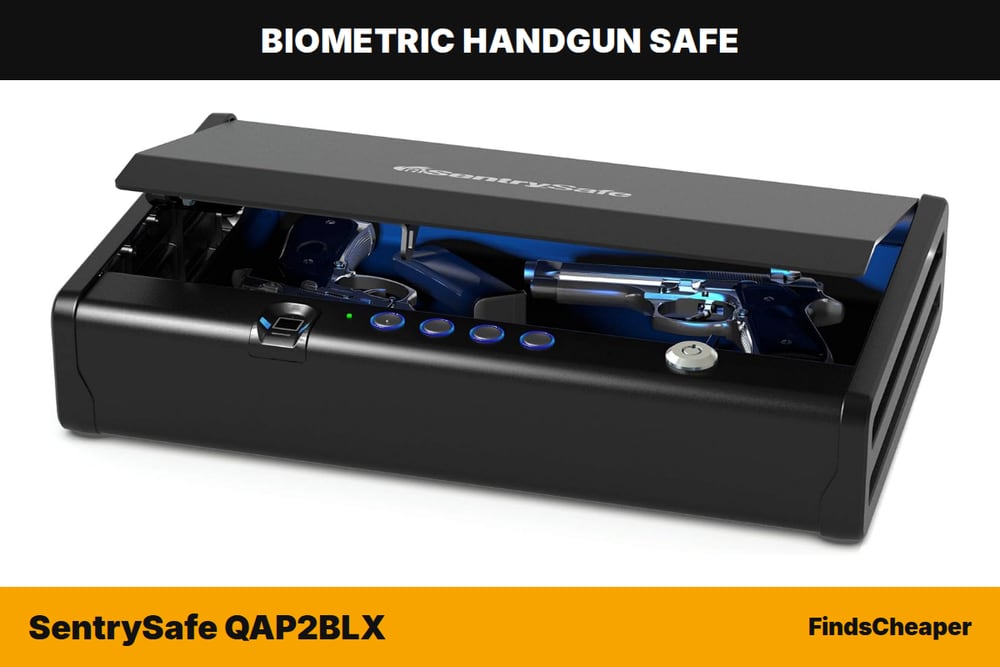
The SentrySafe QAP2BLX lists a fingerprint scanner, a digital keypad and an override key, so a failed scan never leaves you locked out. A gas strut opens the lid for one-handed access, and a blue interior LED helps at night. The listing says it holds two standard handguns or one larger pistol, with an interior of 14 x 6.5 x 2.2 inches, and it comes with a bolt-down kit. It runs on four AA batteries, and SentrySafe recommends name-brand alkalines for best performance, which is a useful reminder that cheap batteries are a reliability risk in their own right. It is also listed as California DOJ-certified for handgun storage. At the time of writing it sat in the $100 to $200 range; check the current price on Amazon or read our SentrySafe QAP2BLX review.
Vaultek LifePod 20 Biometric: a backup port for a dead battery
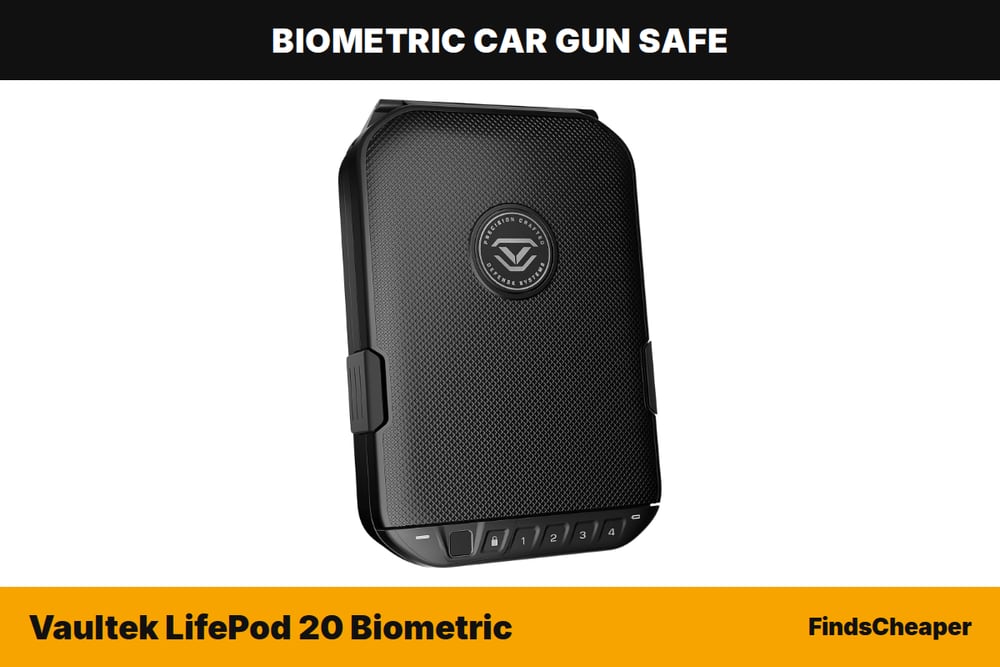
For a portable case, the Vaultek LifePod 20 shows a thoughtful power plan. The listing describes a water-resistant fingerprint scanner, a backlit touch keypad and manual backup keys, plus a hidden micro-USB port behind the keyhole cover that powers the unit if the 9V battery dies. Vaultek quotes battery life of up to a year under normal use. It is a polymer case with a rubber gasket and side latches, a steel security cable, a removable tray and an interior light; the interior measures 9.625 x 7.25 x 2.125 inches and fits a handgun up to 9.25 inches long. It sat in the $200 to $300 range at the time of writing; see today’s listing or read the full LifePod 20 review.
Hornady RAPiD Safe Night Guard: skipping the fingerprint entirely
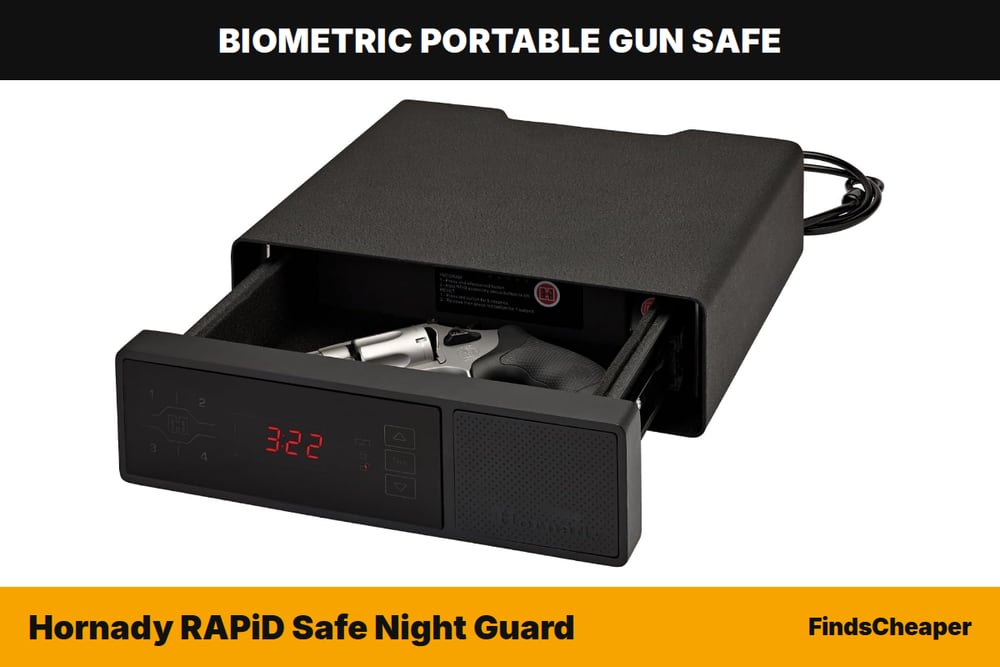
Some buyers decide fingerprint reliability is not worth worrying about and choose RFID instead. The Hornady RAPiD Safe Night Guard opens with an RFID wristband or key fob, an access-code keypad, or barrel keys, and its listing describes AC power with battery backup. It is a nightstand-style unit with a clock and two USB-A charging ports, a spring-assist drawer, 14-gauge steel, two hardened locking lugs and a 1,500 lb security cable. The interior is listed at 2.2 x 9.2 x 6.9 inches. Searches for “hornady rapid safe problems” are worth reading in context: with RFID, the common practical issue is a misplaced tag, so keep the tags in a fixed spot. Its price varies, so check the current price, and see our Hornady Night Guard review or the best RFID gun safes roundup.
On a tight budget, slim under-desk models such as the RPNB RP311F combine fingerprint, keypad and key access in the under $100 range; our gun safes under $100 guide covers that tier.
Troubleshooting: fingerprint, keypad and electronic lock not working
Searches like “stack on gun safe buttons not working,” “winchester gun safe keypad not working,” “cannon gun safe problems” and “snapsafe safes problems” cover different brands, but the first steps are much the same. Always follow your own model’s manual, and contact the manufacturer if these steps do not help.
If the fingerprint reader rejects you
- Open the safe with the keypad or key so you are not working against the clock.
- Clean the sensor with a dry, lint-free cloth and wash and dry your hands.
- Replace the batteries with fresh, name-brand cells, even if the old ones seem fine.
- Delete and re-enroll your prints following the manual, registering the same finger several times at slightly different angles.
- Enroll a second finger, ideally on the other hand, in case of injury.
- If rejections continue after fresh batteries and re-enrollment, contact the brand; a failing reader is a support issue, not something to fix yourself.
If the keypad or buttons stop responding
- Replace the batteries first; weak power is the most common cause.
- Check for the low-battery signal or error pattern described in the manual.
- Make sure you are entering the code at the pace the manual describes; some locks time out between presses.
- Look for a lockout period after repeated wrong entries and wait it out.
- If buttons feel stuck or unresponsive after fresh batteries, contact the manufacturer for service rather than prying at the panel.
Daily habits that make any biometric safe more reliable
- Change batteries on a calendar, not when they die.
- Test every entry method monthly: fingerprint, code and key.
- Keep the backup key outside the safe in a secure place that household members who should not have access cannot reach.
- Re-enroll after injuries or if your scans start failing more often.
- Anchor the safe with its bolt-down kit or cable; see our guide on how to bolt down a gun safe.
- Do not rely on a reader you doubt. If it ever opens for an unenrolled finger, stop using fingerprint access and contact the manufacturer.
Biometric vs keypad: which is more dependable?
A good keypad is generally more predictable than a fingerprint reader because a correct code always works, regardless of skin condition. The trade-off is speed and fumbling in the dark. A fingerprint reader is faster when it works, but it adds a failure mode a keypad does not have. That is why the best answer for most people is a safe with both. Our biometric vs keypad gun safe comparison goes deeper, and if you are still deciding on size, start with what size gun safe you need.
Watch: the SH007ER: The Series channel gives a general overview of biometric gun safes and how they are used.

So, are biometric gun safes reliable enough?
For most households that need fast access to a handgun, a biometric safe from a non-recalled brand, set up carefully and maintained with fresh batteries, is reliable enough. It becomes unreliable when buyers depend on the reader alone, skip the backups or buy from brands with recall history. Treat the fingerprint reader as the fast lane and the keypad and key as the guaranteed lane, and you get the benefits without the risk.
Storage and child-access laws vary by state, so check the rules where you live. For a wider look at every safe type, see our complete gun safe guide, and browse the best handgun safes or nightstand safes for bedside access if you are ready to compare models.
Are Biometric Gun Safes Reliable FAQ
Are biometric gun safes reliable?
A biometric safe from an established, non-recalled brand is reliable enough for quick handgun access when you enroll fingers carefully and keep fresh batteries in it. The fingerprint reader is the fastest way in but not the most predictable, so choose a model with a keypad and key as backups and test every entry method regularly.
What are the most common biometric gun safe problems?
The usual complaints are false rejections from wet, cold, dry or injured fingers, poor enrollment that only captured part of the fingertip, and erratic behavior from weak batteries. The rare but serious problem is a reader that accepts unenrolled prints, which led to recalls of several brands. Good setup fixes the first group; only avoiding flawed models fixes the second.
Why is my Vaultek fingerprint not working?
Start with the basics: open the safe with the keypad or key, clean the sensor and your finger, and install a fresh battery. Then delete and re-enroll your prints following the Vaultek manual, registering the same finger at slightly different angles. If scans still fail after that, contact Vaultek support instead of trying to repair the reader yourself.
What should I do if my gun safe electronic lock is not working?
Replace the batteries with fresh name-brand cells first, since weak power is the most common cause of unresponsive keypads and clicking locks. Check the manual for lockout periods after wrong entries and for the correct entry pace. If it still will not open, use the backup key, then contact the manufacturer for service rather than prying at the panel.
Is a biometric or keypad gun safe more reliable?
A keypad is more predictable because a correct code works no matter the condition of your skin, while a fingerprint reader is faster but can reject a valid finger. For most people the most dependable choice is a safe that offers both, plus a mechanical key, so a single failure never locks you out when it matters.
Which biometric gun safes have been recalled?
Biometric safes from Awesafe, Bulldog (its biometric models), Machir and MouTec were recalled because the fingerprint reader could let unauthorized users, including children, open them. Check cpsc.gov for the exact models and remedies before relying on any safe from those brands, and stop using fingerprint access on an affected unit until you have followed the official recall instructions.
FindsCheaper is reader-supported: as an Amazon Associate we earn from qualifying purchases, at no extra cost to you. We research listings, manuals and owner feedback; we do not accept payment for placement. Prices, coupons and availability change, so check Amazon for the current details. Store firearms safely and follow your state’s storage laws.


One Comment